Saturday, October 8, 2011

Our Mission and Core Values


On September 26th, 2011 the Mukwonago Community Library Board approved the Mission and Core Values statement as presented, replacing our old mission and values.


Mission and Core Values


The Mukwonago Community Library is committed to being good stewards of our community and its resources by:


· Creating a welcoming, friendly and safe environment for all


· Providing access to the best materials and best information in a cost-effective manner


· Inspiring and cultivating partnerships throughout our community


· Successfully integrating technological advances with traditional materials and services


· Helping our community to learn, grow and thrive


The Mukwonago Community Library: Engaging, Empowering and Enriching Your World.


We hope this Mission and Values will help guide our future to remain relevant and supportive to our community as we move forward. Thank you for all of your support as a library patron!

Wednesday, October 5, 2011

Sara Laux Akin visits Preschool Storytime

We all enjoyed a special treat today as Sara Laux Akin shared her book Three Scoops and a Fig with the families at Preschool Storytime.


Special thanks go out to the Society of Children's Book Writers and Illustrators of Wisconsin for bringing the author to our library.

Tuesday, October 4, 2011

New Videogame Releases at the Library

Hitting the shelves today are these fresh titles...

Nintendo DS:
Etrian Odyssey III : the Drowned City
Lego Disney Pirates of the Caribbean

Playstation 2:
Phantasy star universe

PS3:
Bigs 2
NBA 2K 11
Tiger Woods PGA tour 12

Wii:
Bigs 2
Create
Family Party : Fitness Fun
Go Diego Go : Great Dinosaur Rescue
Super Mario All-Stars
Tiger Woods, PGA tour 12
You Don't Know Jack

XBox 360:
Bigs 2
Dungeon siege III
Robert Ludlum's The Bourne Conspiracy
Tiger Woods PGA tour 12
Halo Wars

Monday, October 3, 2011

Technology Tip #12: Enjoyable Web Browsing

One of the easiest ways to learn about computers and other web browsing tools is by using them for entertainment. When you use your computer to watch movies, surf the web, and other fun things...learning how to use them will come naturally (and not feel like work).


Here are a few websites to start you on your entertainment discovery:


StumbleUpon- This website's application helps you to discover web pages, photos and videos that have been recommended by other people. You can also rate the web pages yourself, so the more you use the application the more it gets to know your tastes. I have found some really neat websites through this application, like http://www.jacksonpollock.org/ . What can you find?


Hulu - Hulu is nice because it has a large variety of movies and shows that you can watch for free. That type of (legal) movie selection is a rariety on the Internet. For instance you can watch the popular series The Office or a movie like Beverly Hills Ninja.


Craigslist - Craigslist is a very simple message board with a different website for major metropolitan areas. Essentially it is like a large classifieds website. Use it to find rentals, local people trying to sell items, and job postings. Please be advised that any website that involves people posting can involve scams and fake postings, always use common sense and caution.


Have fun and learn something :).


Construction Photos: Fourteen


Last time you saw what the inside of the wall structure looked like. Now see how it is coming along with drywall! The drywall installation throughout the building is complete.


The painting and work on the exterior is coming along fine. In the coming week the base course for the new parking lot will begin installation.


If you look at the drywall you can see that some of the walls are being painted. Also see the drop down ceiling framework is installed and all of the site lighting is completed.


The exterior wall and window quality was tested on October 4th. Imagine what the view will be like with those floor to ceiling windows!


The library's front door! Does it feel welcoming yet?


A little pop of color on the walls makes it feel a little more like home. There will be a lot of extra private space for studying and group meetings! We hope you are getting as excited as we are! Don't forget you can see how the new library is going today (October 8th) from 10 am to 2 pm at the Library Foundation Signing.

Wednesday, September 28, 2011

Technology Tip #11: Web Address URL

There is a large difference between www.irs.com and www.irs.gov. One is the legitimate Internal Revenue Serivces website, and the other is a imitation. Who is responsible for the website? The American Library Association has some recommendations:

Many URLs (Uniform Resource Locator or web site address) include the name and type of organization sponsoring the webpage. The 3-letter domain codes and 2-letter country codes provide hints on the type of organization. Common domain codes are:


DomainSample Address
.edu = educational institutionhttp://docsouth.unc.edu
.gov = US government sitehttp://memory.loc.gov
.org = organization or associationhttp://www.theaha.org
.com = commercial sitehttp://www.historychannel.com
.museum = museumhttp://nc.history.museum
.net = personal or other site

Monday, September 26, 2011

Take Our 2011 Fall Survey!

Come down to the Mukwonago Community Library and let us know how we are doing! You can do that by grabbing a copy of the 2011 Fall Survey and filling it out here at the library. It is less than 15 questions and really helps us understand the needs of our community.
--- --- --- --- --- --- --- --- --- --- --- --- --- --- --- --- --- --- --- ---

Did you know that you would pay $210.00 in out of pocket expenses if you purchased 3 books, 3 movies, 2 audio books and 5 magaines? Save money and use the Mukwonago Community Library!

Wednesday, September 21, 2011

Technology Tip #10: Use Your Kindle to Check out E-Books

For the last several years Nooks and other e-readers have had the ability to borrow e-books from public libraries. This borrowing has grown in popularity as the price of books go up and the price of e-readers go down. Kindle owners have been excluded from these library services because Amazon did not allow the use or "sharing" of e-books. Today brings exciting news for Kindle owners, starting today you can borrow e-books from public libraries!


Here is a brief explanation of how to borrow e-books for your Kindle from the Mukwonago Community Library. If you don't have a Kindle and you still want to see how this process works please remember the library has a Kindle available for checkout. Or if you just need more detailed instructions come see us at the reference desk.


Step 1: Go to the library website: http://www.blogger.com/www.mukcom.lib.wi.us


Step 2: Click on the Subscription Database box, and then scroll down to "Overdrive". Click once on Overdrive.


Step 3: Log in to Overdrive with your library card number.


Step 4: There is currently a shortcut on the left hand side of the Overdrive catalog that says "Now Available" and has a picture of the Kindle. Left click there once.


Step 5: Now you have a list of all available titles, add the titles to your cart that you are interested in.


Step 6: When you are ready to check out the "Get for Kindle" button will take you to the Amazon website.


Step 7: Once at the Amazon website you will have to download the appropriate software to your computer.


Step 8: Then the book should appear on your Kindle.


For visual instructions from the Seattle Public Library please try this link.


Good luck and have fun reading!


Step 4:

Tuesday, September 20, 2011

Want to See the New Library Before It Opens?

If you want a chance to take a sneak peak at the new Mukwonago Community Library on 511 Division Street before it opens, you should come to our Foundation Signing Event.
The new library building is looking great and closing in on completion. It wouldn’t have been possible without terrific support from our community, so stop in to the library construction site on Saturday, Oct. 8 between 10 a.m. and noon and sign the library’s foundation. We want to get as many signatures as we can before we cover the cement foundation with flooring and carpeting. This is a chance for everyone in our community to “leave their mark” on the new library and see it before it officially opens!

Wednesday, September 14, 2011

Technology Tip #9: Mint.com

Mint.com is a free website and cell phone app that allows you to keep track of your finances in one place. I have been using it for over 6 months now and find it awesome and with over 6 million users it will be around for awhile. It offers a ton of nifty features like bill reminders to your phone, investment tracking, notification of overdraft, helpful graphs, spending tracking, and more. I have starting using it to track my retirement investments and my little nest egg.


With any website that helps you track financial information be prepared to share your personal information. So if you are still a little new, or do not feel completely comfortable with how good your security and identify theft protection is I would not utilize this website yet. (But they do have exceptional security for a free service.) I highly suggest this if you are a parent trying to teach a young 20 something how to better deal with their finances, it links in the fun of technology with the education of better fiscal responsibility. For a better idea of what they provide check out their promotional video!

Epic Fantasy: 20 Core Titles from Library Journal

Attention Fantasy and Science Fiction readers, this is an exciting blog for you. Library Journal (August 2011, pg 23) magazine suggested some core titles that every library should have in their collection. They suggest 10 classic authors and 10 contemporary authors. My hope is that you find something you have never read. Enjoy your journey! If you suggest any titles please share them in the comments below!

CLASSICS

Brooks, Terry - The Shannara Trilogy
The Sword of Shannara (1977)
Elfstones of Shannara (1982)
Wishsong of Shannara (1985)

Donaldson, Stephen R. - The Chronicles of Thomas Covenant the Unbeliever
Lord Foul's Bane (1977)
The Illearth War (1977)
The Power that Preserves (1977)

Eddings, David - The Belgariad
Pawn of Prophecy (1982)
Queen of Sorcery (1982)
Magician's Gambit (1983)
Castle of Wizardy (1984)
Enchanters' End Game (1984)

Feist, Raymond - The Riftwar Saga
Magician: Apprentice (1982)
Magician: Master (1982)
Silverthorn (1985)
A Darkness of Sethanon (1986)

Jordan, Robert - The Wheel of Time
The Eye of the World (1990)

Kay, Guy Gavriel - The Fionavar Tapestry
The Summer Tree (1984)
The Wandering Fire (1986)
The Darkest Road (1986)

Kurtz, Katherine - The Chornicles of the Deryni
Deryni Rising (1970)
Deryni Checkmate (1972)
High Deryni (1973)

Le Guin, Ursula K. - The Earthsea Saga
A Wizard of Earthsea (1968)
The Tombs of Atuan (1971)
The Farthest Shore (1972)
Tehanu (1990)
Tales from Earthsea (2001)
The Other Wind (2001)

McKillip, Patricia A. - The Riddle of Stars Trilogy
The Riddle-Master of Hed (1976)
Heir of Sea and Fire (1977)
Harpist in the Wind (1979)

Tolkien, J.R.R. - The Lord of the Rings Trilogy
The Fellowship of the Ring (1954)
The Two Towers (1954)
The Return of the King (1955)

CONTEMPORARY

Abercrombie, Joe - The First Law Trilogy
The Blade Itself (2007)
Before They Are Hanged (2008)
Last Argument of Kings (2008)

Abraham, Daniel - The Long Prince Quartet
A Shadow in the Summer (2006)
A Betrayal in Winter (2007)
An Autumn War (2008)
The Price of Spring (2009)

Bujold, Lois McMaster - Chalion Series
The Curse of Chalion (2001)
Paladin of Souls (2003)
The Hallowed Hunt (2005)

Carey, Jacqueline - Kushiel's Legacy
The Phedre Trilogy: Kushiels Dart (2001)
Kushiel's Chosen (2002)
Kushiel's Avatar (2003)

Jemisin, N.K. - The Inheritance Trilogy
The Hundred Thousand Kingdoms (2010)
The Broken Kingdoms (2010)
The Kingdom of Gods (Oct. 2011)

Martin, George R.R. - A Song of Ice and Fire
Game of Thrones (1996)
Clash of Kings (1999)
A Storm of Swords (2000)
A Feast for Crows (2005)
A Dance with Dragons (2011)

Newton, Mark Charon - Legends of the Red Sun
Nights of Villjamur (2010)
City of Ruin (2011)
The Book of Transformations (2012)

Parker, K.J. - The Engineer Trilogy
Devices and Desires (2005)
Evil for Evil (2006)
The Escapement (2007)

Rothfuss, Patrick - The Kingkiller Chronicles
The Name of the Wind (2007)
The Wise Man's Fear (2011)

Sanderson, Brandon - The Mistborn Trilogy
The Final Empire (2006)
The Well of Ascension (2007)
The Hero of Ages (2008)


Saturday, September 10, 2011

Pathfinder: 9/11 Resources

With the 10th anniversary of 9/11 the entire nation will be given the opportunity to commemorate and reflect upon their memories. There are many different ways to reflect including attending community memorial events, asking friends and family if they recall what they were doing when they found out, or watching special coverage that will be on the news this weekend.


If you feel like you want to delve into the reflection a little more I suggest a few of the resources we have here at the Mukwonago Community Library.


Downloadable Internet Books:


Messages: Signs, Visits, and Premonitions from Loved Ones Lost on 9/11 by Bonnie McEneaney (2010)


The Ground Truth: The Untold Story of America Under Attack on 9/11 by John Farmer (2009)


The Commission: The Uncensored History of the 9/11 Investigation by Philip Shenon (2008)


Books:


The 9/11 Report: A Graphic Adaptation

by Sid Jacobson (2006)


Watching the World Change: The Stories Behind the Images of 9/11

by David Friend (2006)


Aftermath: Unseen 9/11 Photos by a New York City Cop

by John Botte (2006)


Without Precedent: The Inside Story of the 9/11 Commission

by Thomas Kean (2006)


The 9/11 Commission Report: A Final Report of The National Commission on Terrorist Attacks Upon the United States by Nat Comm on Terrorist Attacks Upon the US


A Nation Challenged: A Visual History of 9/11 and Its Aftermath

(200)


DVDS:


The 9/11 hijackers: inside the Hamburg Cell (2007)


New York Firefighters: The Brotherhood of 9/11 (2002)


In Memoriam: New York City 9/11/01 (2002)


Websites:


Wednesday, September 7, 2011

Technology Tip #8: Online Subscriptions

If you order a magazine or have a cable provider, more and more often vendors are offering complimentary online subscriptions. This may not seem like a big deal until you consider the possibility of legally sharing access to those shows with friends and family.


My parents have a cable subscription with the "works" including HBO. Dish Network as a extra service provides them with the ability to access a website that has all of the latest shows, movies, and other viewing material available with their subscription. Since they don't use the online version they provided me access to their online subscription, and voila I can watch HBO on my computer.


I subscribe to a cooking magazine that my friend who lives across the state always wants to borrow when she comes to my house. The other day I realized I could give her access to my free online subscription and I would be able to keep my magazines for a change!


If you consider offering or sharing these online subscriptions with friends or family, imagine the amount of money it could save for people to pool resources. It also does not have legal issues and implications that resource piracy has. So double check your magazine, cable and other media subscriptions to see if you have online access.


Hiring for Circulation Assistant Position

The Mukwonago Community Library is hiring a part-time Circulation Assistant. Seeking a dependable, friendly, detail-orientated person to staff a busy check out desk. It is a weekly schedule with four hour shifts on Tuesday and Thursday from 1:30 pm to 5:30 pm. Please apply in person at Mukwonago Community Library, 1012 Main St., Mukwonago, WI by September 12th.

Tuesday, August 30, 2011

How to Choose a Movie

Step 1: Pick the title of a movie you feel like watching in your head. For example my favorite movie of all time is Frida (the cinematography is gorgeous and I am sucker for biography type stuff). Or pick a favorite actor or director. (Director is my favorite way to search!)


Step 2: Go to http://www.imdb.com/, that is the Internet Movie Database. (Don't worry your going to love it!).


Step 3: Once you are at IMDB type the name of your movie into the search bar and click the "Go" button.


Step 4: IMDB will have a list of movies, actors, directors, or other items you are looking for. Click on the correct one.


Step 5: Every imaginable detail about this movie will be presented to you, including cast, trailers, quotes and more. If you scroll to the bottom of that page it will list recommendations. For example they recommend if you like Frida, you will enjoy:


Step 6: Go to the Mukwonago Community Library catalog and start requesting your movies.


Step 7 is Optional: Get some popcorn for your movie night!

Monday, August 29, 2011

Technology Tip #7: Find Cheap Textbooks

If you are a college student or help a college student out...you know the agony of shelling out hundreds of dollars for books this semester. Just like any product you can use websites to find lower it. Just be wary for shipping costs and figure that into your final total. Cheapism.com offered three websites as their top choices and after trying them I have to agree!

Here are Cheapism’s top picks for college textbooks sites.

Textbook rental site Chegg.com offers 2.4 million titles and gives students the option to send books back for free or buy them at the end of the term. Students can also buy and sell books. The site holds renters accountable for the books’ condition upon return, so it may not be the best choice for copious highlighters, but it earns positive reviews for providing books that look like new. Users also praise the site’s customer service. (Where to buy)

Textbooks.com boasts a selection of 7 million books to buy or rent and offers free shipping on orders of $25 or more. User reviews often cite Textbooks.com as the cheapest option, and the site itself promises up to 90 percent off. Customers also applaud a redesign that makes it easy to find the best deal. (Where to buy)

ECampus.com offers not just textbooks but regular books, DVDs, Blue-ray discs, and college apparel. The site’s textbook inventory comes from a network of third-party sellers, making it susceptible to complaints about delinquent deliveries. Shipping is free for rental returns and orders over $59. (Where to buy)


Friday, August 26, 2011

Computer Classes Have Returned!!


For all those that have been asking, our much-loved free computer classes return beginning Tuesday, September 6 and continue through the end of November. Whether you have never touched a computer before or are an Internet dynamo, let the Mukwonago Community Library’s computer guru Kristen, show you something new. Classes include topics like Computer Basics, Creating Family Newsletters, Internet Basics, Word Processing with Microsoft Word, Using Graphics, and E-Mail Basics, just to name a few. No experience is needed for our Computer Basics course, and all others only require that you feel comfortable using a mouse. We’ll even provide a laptop for use during the class. Class size is limited so register today. To register or for more information, stop by the front desk or call us at (262) 363-6411. You can also see our computer class schedules on our website’s Adult Services page at http://library.booksite.com/6648/nl/?list=CNL14

Thursday, August 25, 2011

Construction Photos: Thirteen

We are fully roofed! While the windows aren't in yet, having a roof on the entire structure will allow the inside work crews to get even busier than they have been. A major milestone reached! Here are the most recent pictures, including some great shots of the tower "cap" being put in place:


The "skeletal" walls of the local history/ conference room (left side) and one of the new study rooms (right side). Sheetrock will start to go up once the windows are received and installed-- hopefully within the next few weeks.


The Director's cage. They assure me it will look very nice, and much less like a jail cell, when everything is complete. We'll see....


The West wall, fully bricked and shingled. Only the windows remain to be installed. Cool!


The tower cap on its way to its final home.


Getting closer!


Almost there. The crane operator was surprised at how smoothly this went. He expected the cap to sway a bit, but it was rock solid the whole way.


A safe landing!

Wednesday, August 24, 2011

Technology Tip #6: How to Get the Software You Need At Home For Free


A lot of people come to the library to access the software we have on the computers. They need Microsoft Word to update their resume, Microsoft Publisher to make a poster for an event, Microsoft Excel to make a budget, etc. This software can be expensive depending on where and when you buy it. Microsoft Office Student Edition can range anywhere from $88 to $290.

If you aren't in a position to afford that type of software, don't worry there are alternate options for you to consider, for free. This type of free software is known as "open source" software. The concept behind it is that instead of one company being behind the creation, a team of volunteers help create it. When open source software first came on the scene in the late 90s it wasn't very popular because the software wasn't as "slick" as the kind you could pay for. Slowly but surely open software has grown in popularity and in product stability.

There is an open source software version for almost any software you can conceive of. Be well aware before you start downloading things willy-nilly. Unless you can find a reputable source the recommends the software, do not download it! Here are a few trust worthy open source software that I recommend: (click on the link to get to the page you can download these programs from).

If you need Microsoft Word, Excel, Publisher, download Open Office.
If you need Adobe Photoshop download Gimp.
If you want Windows download Ubuntu (it has Open Office & Gimp included)
If you need something to help you with formatting your e books to share try Calibre.

If you don't have the internet on your home computer but still want these computer have no fear! Spend a few bucks and get yourself a memory stick. When you come to the library we can help you download the software to the memory stick. Then you can move the software from your memory stick to your home computer.

If you have any questions come see us at the reference desk. If you can get enough people together that want to learn the ins and outs of one of these programs we may be able to make a computer class.


Tuesday, August 23, 2011

Let me Cell you on a idea...

I heard some cool news from our Library Automation Coordinator today. "With 2011 LSTA funds a service called LibraryAnywhere was purchased to give libraries a mobile website as well as apps for the public to access information about the libraries as well as search the catalog, place holds and renew materials." Which means coming next month if you download the "Library Anywhere" application to your phone, you will have access to some information and services through the Mukwonago Community Library!

That means the next time you are in a long line at the supermarket...instead of buying that magazine in line...put it on hold from your cell phone.


Thursday, August 18, 2011

Beanbags and Books: hanging out at the Library.


Construction Photos: Twelve

We've got bricks! Always a good sign on a building that features brick from top to bottom. It's not all installed yet-- that'll take a little while-- but we're on our way. Plus, the building is very nearly completely enclosed and the workers have started to install shingles. Soon weather won't be much of a factor for the remainder of the project-- yay! Here are the latest pics:

The masonry crew installing the lower bricks on the northern wall.


Looking east down the "main thoroughfare" from the large bay window on the west side.


The community room, looking north from the lobby entrance. The room will be divisible into several different configurations using a partition system that will be installed later.


The foundation for our garbage enclosure and storage shed. Not the most exciting aspect of the project, but it is important to have somewhere to put your garbage and recycling and to store your garden tools and implements.


A wide shot of the eastern exposure, with the entry tower "cap" on the ground to the far left and the tower itself, waiting for its cap, on the far right.


A close-up of the tower cap. It is awaiting the arrival of the large crane that will hoist it into position on the entry tower.

Tuesday, August 16, 2011

Technology Tip #5: Master Popular Software with Learning Express

I have mentioned Learning Express multiple times in blog posts. I do this because it is a great learning tool, especially for beginners. These free video tutorials can help you learn the popular software listed below.

I cannot stress how important knowing some of this software is for the workplace. If you are nervous about jumping in head first, try Microsoft Word. It is a easier word processing software that you can find on most computers. Just go to our Subscription Database Page, click on Learning Express, and then select "Popular Software Tutorials" in the right hand side. If it is your first time you will have to register so they can track your progress. Good luck!

Monday, August 15, 2011

Worth a Look: LibraryThing


In case you haven’t heard of the website LibraryThing, let me introduce you to a fantastic resource for all of us book lovers. LibraryThing is essentially a place to catalog all your books online, discuss them if you’d like, and share reading suggestions. If you are like me, you have 100’s of beloved books scattered across your home, not even sure what books you have anymore. LibraryThing brings some semblance of order to them. Simply enter each book using it’s ISBN number, title, or author, and LibraryThing will automatically search the catalogs of nearly a 1000 libraries and bookstores around the world (including the Library of Congress and Amazon) to fill in every piece of information you could possibly want to know about that book—title, authors, subjects, first lines, series’, reviews, cover images, you name it. It will even assign Dewey Decimal System numbers to your books if you want to get all librarian on them.


There are more features than we can possible mention here, but another great use for LibraryThing is to gather ideas for your next read. Once you have a few books catalogued, LibraryThing uses recommendations from its 1.3 million users to give you reading suggestions based on the books in your library.

To that end, the Mukwonago Community Library has started its own LibraryThing “Catalog of Recommendations” (you can also find it by searching LibraryThing for “Mukwonago library”). In this catalog you will find a completely random assortment of books--for adults, teens, and children--that we, for whatever reason, really like and think you might too. So check it out, browse around, and follow some links. There’s no telling what great book you might find.

Saturday, August 13, 2011

Inside Look at the MAM's exhibit: The Emperor's Private Paradise: Treasures from the Forbidden City


Join us at at the Mukwonago Community Library on Thursday, August 25th at 6:30 pm, as Judy White docent from the Milwaukee Art Museum gives an hour long audio/visual presentation about the Museum's featured exhibition. "The Emperor's Private Paradise: Treasures of the Forbidden City".

Gain insights into the breathtaking treasures commissioned by the 18th Century Qianlong Emperor to adorn his private residence deep in China's Forbidden City. The stunning collection ranges from elaborate to the quietly personal--reflecting the refined vision of history's most influential rulers, revealing his reverence for nature and his dedication to Buddhism, Confucian morals, and scholarly pursuits.

I got the opportunity to visit this collection and even by today's standards you can see the quality and exquisiteness of each piece. It was the first time I had ever seen a true lacquered piece of Chinese artwork with inlaid gold so closely. Seeing the best type of this art from the country in which lacquering originated was just astounding. Hopefully you get the chance to see this display before it ends on September 11th, 2011. Otherwise come get some of the historical background and come discuss with us at this even and see some pictures/slideshow of these beautiful pieces!

Wednesday, August 10, 2011

Construction Photos: Twelve

The building is really taking shape! With the trusses up, you can see how the roof lines will look and soon the sheeting will be down and the crews can work on getting shingles in place. Here are some recent views of the progress:
The east side of the building with the main entry in the middle and the community room to the
right. All of the trusses are in place and the plywood sheeting is being installed.


Another view of the eastern exposure and the main entry.


The northwest corner of the building. The bank of windows on the north side is "visible" in the foreground. This will look very similar to the north end of the old library.


A final view from the south.

Monday, August 8, 2011

Technology Tip #4: Ctrl, Alt, Del

Most computer users are familiar with the "Open Task Manager" feature. For those of us who aren't...it is worth mentioning.

If you ever find yourself in a situation when the computer is running veeerrrrryyyy slowly or continually freezing, the "Open Task Manager" feature may help you fix it. The common problem with slow or continually freezing computers is the computer is just trying to do to much at once. Depending on your computer's speed, used memory, or age it can only do so much at one time.

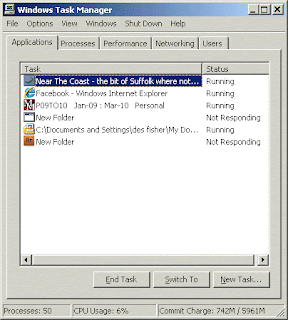
The "Open Task Manager" feature will help you list everything that the computer is doing. From that list you can see what is is having troubles with. Next to the list it will either report the program as "Responding" or "Not Responding". You will want to go through and close any programs that are Not Responding. Now let's show you how to do it!

Step 1: Press the "Ctrl", "Alt" and "Delete" button all at the same time. Hold it long enough for the screen to change or a box to pop up.

Step 2: Depending on what operating system your computer has, what screen that comes up, or what box that pops up will be different. This is the most common box that will appear. Notice that it lists everything that the computer is running on the left hand side "tasks" and the status of those tasks on the right.

Step 3: You will want to left click once on the task that is "Not Responding". Then left click the "end task" button. Repeat this step until you have closed all of the "Not Responding" tasks.

Step 4: When you are all done to close the "Task Manager" click on the "x" in the upper right hand corner of the screen.

Give it a try!


Friday, August 5, 2011

Construction Photos: Eleven

We have walls! Or at least the beginnings of walls. Soon we'll have a roof, as well. Things are really taking shape over at the construction site and so far we are still on pace to have a grand opening on Midnight Magic weekend. Here are the latest shots:

Here's a shot of the southeast corner. You can see the "outline" of the walls and the peaked "hip" roof is starting to take shape as the crews get the trusses set.


A view from the northeast looking back at the community room (foreground) with the main entry to the left (tower element).


The west wall. some of the plywood sheathing is already in place on this wall. With the sheathing up, you can really see how the big bay window (far right) will look-- it's going to be awesome!


Final shot-- looking down the entryway of the library. This will be the high-ceilinged space that runs from the new front entry to the bay window, the "aisle" leading into the library.

Wednesday, August 3, 2011

Technology Tip #3: Printing Made Easy

To print from most Microsoft Programs and web browsers,

Hold down the Ctrl button and hit the "P" key.

Try it now!

A box with your printing options will pop up on your screen. The options you have for printing will be different depending on the program or web browser you are using. But most will give you the option of changing from color to black and white printing, the number of pages to print, and more.


Friends of Mukwonago Community Library Secure $30,000+ Grant

We received awesome news today from the President for the Friends of the Mukwonago Community Library, Romaine Kleinfeldt. The Friends had submitted a grant application to the Potawatomi Bingo and Casino's, Miracle on Canal Street Program. The Friends were selected in the final drawing!!!

The drawing guarantees a grant between $30,000 to $50,000. These funds must be used towards children's programs and materials. We congratulate the Friends on their success and thank for their hard work and diligence in supporting the Mukwonago Community Library. It will be exciting to see what new and diverse programs this grant money will allow. If you run into Romaine while you are at the library, please congratulate her! Thank you to anyone that also supports the Miracle on Canal Street program.

Monday, August 1, 2011

Appalachian Storyteller, Sari (Ma) Semple Visits Aug. 10

In the mood for a good old fashioned story told by someone who knows how to spin a yarn? Stop by the Mukwonago Community Library on Wednesday August 10 from 6:30pm-8pm and be enthralled with the master story-telling of Jessica Michna who dons full traditional garb to portray Sari (Ma) Semple, a folksy story-teller from 19th century Appalchia. Sari takes us back to the foothills of the Appalachian Mountains of the mid-nineteenth century. As Sari spins her tales the listener is transported to those hills. The stories blend together the folklore and the gritty reality of life in the ridges and hollers of Appalachia. Young and old alike will be spellbound by the rich tapestry of words woven by Sari. She may not be the First Lady of the Land but she certainly is the first lady of Appalachia.

For more information, stop by the Reference Desk, call (262) 363-6456, or write us at mukref@gmail.com